How much data does video call use in 30 minutes?
At standard quality, a reasonable planning range is about 225–450 MB. HD may use roughly 450–900 MB or more.

 Chamet
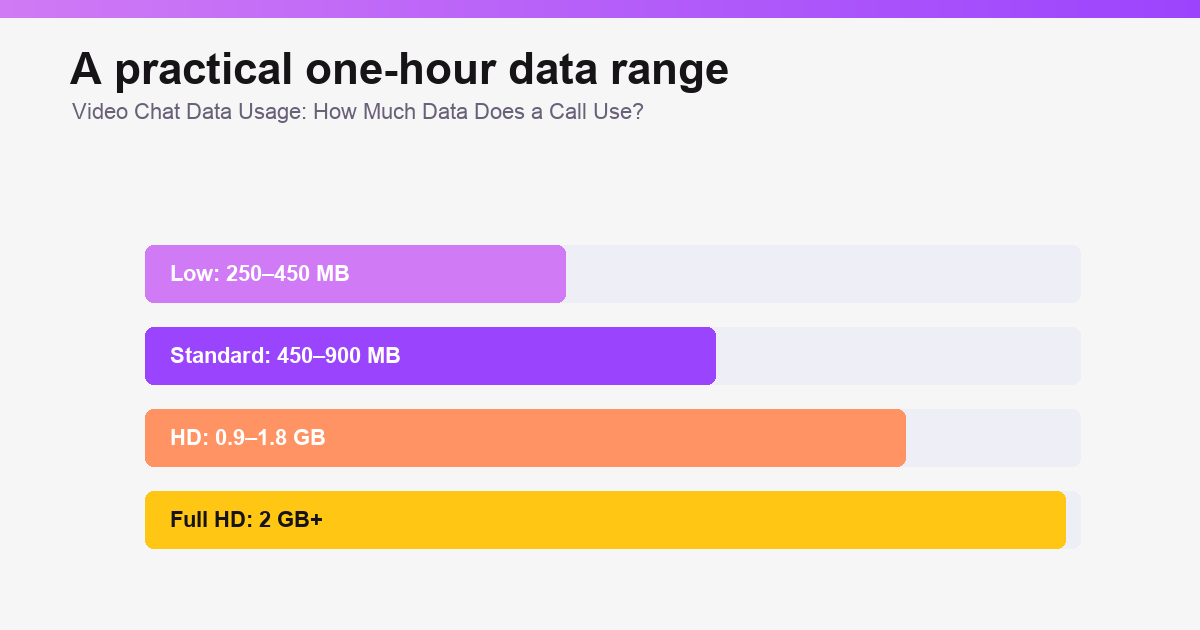
Video chat data usage is usually measured in hundreds of megabytes per hour and can exceed a gigabyte at HD quality. There is no single number because apps adapt resolution, frame rate and bitrate to the phone, network, movement and number of visible participants.
For a one-to-one call, use these planning ranges rather than a guarantee:
These figures estimate combined sending and receiving. A mobile data video call with mostly static faces may use less than a call with movement, effects or changing backgrounds.
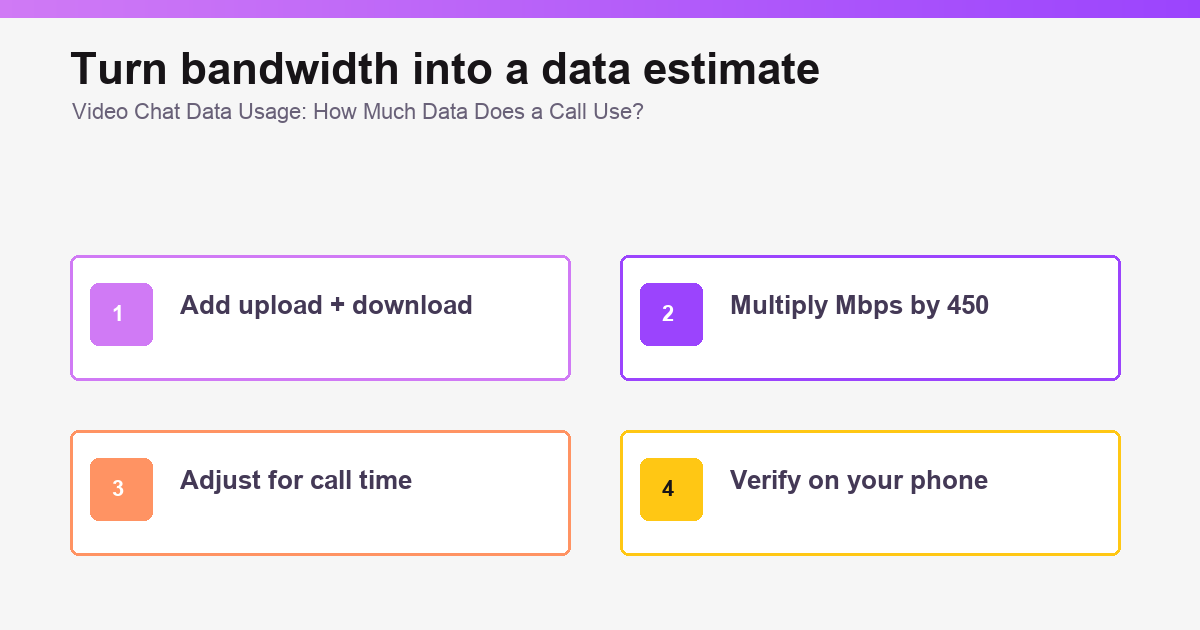
To answer how much data does video call use, add upload and download bandwidth in megabits per second, then multiply by about 450 to estimate megabytes per hour.
For example, a call using 0.6 Mbps up and 0.6 Mbps down has a combined rate of 1.2 Mbps. `1.2 × 450` is about 540 MB per hour. Real totals include overhead and adaptive changes, so treat the result as a planning number.
Zoom’s official web guidance recommends about 600 kbps up and down for high-quality one-to-one video, 1.2 Mbps each way for 720p, and substantially more for 1080p. This illustrates why video chat data usage can vary several-fold with quality.
Resolution and frame rate: higher quality sends more image information.
Movement: a still background compresses more efficiently than dancing, walking or a busy Party Room.
Group layout: a group video chat may download several streams, while a one-to-one call generally shows one remote stream.
Network adaptation: apps can lower quality when bandwidth is limited. Google and Zoom both document automatic or manual quality reduction.
Effects and backgrounds: local effects mainly affect processing, but their visual complexity can also change compression behavior.
1v1 Video Chat with Real People | Chamet is focused on one person at a time, which can make the data pattern easier to understand than a multi-video grid.
If standard video chat data usage is 600 MB per hour:
For a 1.2 GB-per-hour HD call, divide those allowances by the same proportions: 200 MB for ten minutes and 600 MB for thirty minutes.
The best answer to how much data does video call use is the device’s own counter. Reset app data statistics, make a timed call, then compare the total. Check both the Chamet app and browser if you use both; the operating system may list them separately.
Use at least two calls because the first may update assets or cache content. A mobile data video call counter may also include background activity from the app.
Turning off video is the strongest way to reduce video chat data. Zoom and Google both recommend audio-only or reduced quality when bandwidth or data is limited.
Chamet: 1v1 Video Chat & Live Video Call App - Make Chat Borderless offers calls, live rooms and group experiences; live viewing and multi-person rooms can have different usage patterns from 1v1 calls.
Ten thirty-minute standard calls at 600 MB per hour use roughly 3 GB. Ten thirty-minute HD calls at 1.2 GB per hour use roughly 6 GB. Add a buffer for adaptation, app updates and other content.
Tracking video chat data usage over a full week gives a more reliable planning baseline than judging one unusually short or high-quality call.
Open Chamet: Live Video Chat & 1v1 Calls with Strangers on Wi-Fi to run your own timed test. That measurement is more useful than any generic mobile data video call estimate and helps you reduce video chat data based on your actual device.
Review video chat data usage again after changing quality settings so you can confirm whether the adjustment made a meaningful difference.
'%20stroke-width='2'%20stroke-linecap='round'%20stroke-linejoin='round'/%3e%3c/svg%3e)
At standard quality, a reasonable planning range is about 225–450 MB. HD may use roughly 450–900 MB or more.
Yes. Both the video you upload and the stream you download contribute to total mobile data usage.
Yes. It removes your outbound video stream, although incoming video and audio may continue. Turning off all video saves more.
To reduce video chat data, lower quality or turn off video, pause other network activity and move to Wi-Fi when possible.
Join millions of users and meet your next best friend today.